Axioo Imut


Hmm bukannya pada pulang malah ...


Apa gara - gara ini nii yaa ..


Tetap sumangut :)


Straxx Excel Password Remover


Instructions

This program works on the active workbook in Excel.
This program gives you 2 or 3 new menu items in Excel:
1) Unprotect sheet
2) Unprotect workbook
3) Unprotect all (PRO version only)
The first two removes protection from active sheet/workbook, and the PRO version displays a password that works (most probably not the same as the original).
“Unprotect all” removes workbook protection (applied with “Tools”-”Protection”-”Protect workbook”) and all worksheet passwords in the active workbook. It displays no message at the end, it just stops running.
When the program is running, look to the Excel status bar (on the lower left) which will display the running time.
If Excel appears to freeze, just let the macro do its work. It may take up to a few minutes in Excel 2007, in Excel 2010 it is very fast (usually within a second).

Instructions for pre 2007 versions of Excel
Loading this add-in in Excel gives you the extra menu-items on the bottom of the “Tools”-menu (or equivalent in non-English versions of Excel).
To load this add-in in Excel: Open it the same way you do with Excel workbooks. Installing the add-in does not work for all users.

Instructions for 2007 and 2010 versions of Excel
You must enable macros when you open the workbook if asked.
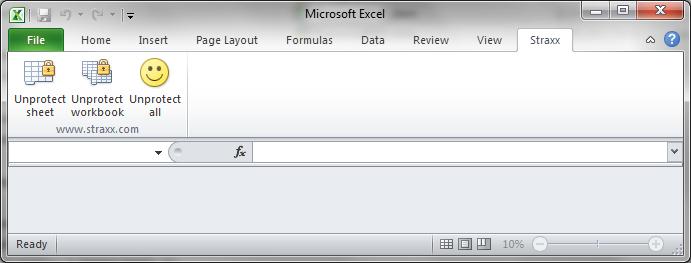
If your settings allows macros to run you will find the new menus under “Straxx” (to the right on the menu bar), and you are ready to go.
If not there are two alternatives:
1. Add the location of password*.xlam to the trusted locations.
Under “Excel options”-”Trust center”-”Trust center settings…”-”Trusted Locations”-”Add new location”, add the path to where password*.xlam is stored
2. Set your macro security level one step down.
Under “Excel options”-”Trust center”-”Trust center settings…”-”Macro settings”, set the level down to “Disable all macros with notification”
Close Excel, start Excel and open password*.xlam
The image below shows the new menu items:

http://www.straxx.com/store/wp-content/uploads/2012/05/excel_demo.jpg

Instructions for Excel 2011

Loading this add-in (and accepting macros to run) in Excel gives you the new menu items on the new “Straxx”-menu (just left of the Help-menu).
To load this add-in in Excel: Open it the same way you do with Excel workbooks. Allow macros to run.

DOWNLOAD

http://www.straxx.com/


Anggrek Imut


Anggrek imut ini tumbuh subur di halaman "Server ST-DU 2" 

Anggrek mini ini berukuran mekar penuh hanya 5 mm, tetapi tumbuhan ini memiliki wangi yang khas dan mampu bertahan 3 minggu tidak layu (luas).
Menurut Pak Panji, anggrek ini di ambil dari Gunung Sengungklung.

Beberapa waktu lalu saya mencoba untuk membawa pulang, menanam dan merawatnya di rumah alhasil, mati kering, karena anggrek ini memang lebih cocok berada di daerah sejuk dan lembab.


Mengatasi Ngeprint Berbayang, Double, Garis Tidak Lurus


Ngeprint garisnya double ?
Hurufnya berbayang ?
Garisnya ga lurus  ?
Penceng sana sini ?


https://encrypted-tbn2.gstatic.com/images?q=tbn:ANd9GcQ3BnsmXRUOqhXASne0iTsPzwZWCeifxzKIY3ZF839IFoU7fN2HRQ


Coba deh dengan mengelap pita bening yang ada dibagian dalam  printer dengan tissu lembut, kerjakan dengan hati" tentunya, agar tidak merusak pita nya.

:)

**** Prepare Survey Buat Repeater ****

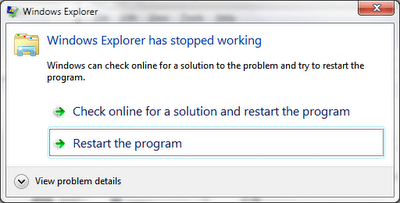
Windows Explorer Has Stopped Working


PROBLEM ?

CARANYA :

1: Buka Fasilitas RUN Windows (Logo windows + R) Dan Ketik gpedit.msc.
2: Pilih "Computer Configuration -> Administrative Templates -> System -> Internet Communication Managemen -> Pilih Internet Communication settings" 
3 : Double Klik pada "Turn off Windows Customer Experience Improvement Program" dan pilih Enable.


CARA LAEN :

Klik kanan "My Computer" -> klik "Properties" -> "Advenced System Setting" -> "Performance Setting" -> hilangkan check list pada "Show Thumbnails Instead of Icons" -> Apply dan Oke


Remove Message Windows Has Detected A Hard Disk Problem


https://blogger.googleusercontent.com/img/b/R29vZ2xl/AVvXsEhWvnDEOhF_MMF_STo4dAZhs9kRn7vNaPCvAPRwkWwoDjt5YXsK2ehf1qeEyEVh1f0CiZGnh8C_x1Bo6_g2H6Zrq5_B68QuTMh1I5xDxzrmwZSLWX_ZvBNxfCJENG8wwuyhMy7QzjAM1w8/s1600/1.png

 STEPS :

1. Run => gpedit.msc


Gpedit.msc


2.  Computer Configuration > Administrative Templates > System > Troubleshooting and Diagnostics > Disk Diagnostics


Disk Diagnostics


Settings                                                               ->  Set It To

Disk Diagnostic :Configure Custom alert text        ->  Disabled

Disk Diagnostic :Configure Execution Level          ->  Disabled


Set It to disabled 


4. *************  Dilanjut, ngopi bareng ning BM Mabes *****************

Pelangi Senja


Indahnya ciptaan Yang Maha Kuasa ...


@ Jogorogo, Pule, Trenggalek


Sinau Bebarengan